Recently I had to copy couple of big docker images from a guest OS to windows host and I wanted to use a very useful feature called Shared Folders (Manage -> Virtual Machine Settings -> Options -> Shared Folders) but nothing was showing up in the default mount place /mnt/hgfs
I started searching for a solution online but most of the advices did not work for me. What did work was to mount the share manually. If for example you have a share on host system with a name myshare and your folder sharing is either "Always enabled" or "Enabled until next power off or suspend" then on guest just execute:
sudo mkdir /mnt/mynewshare
sudo vmhgfs-fuse -o allow_other .host:/myshare /mnt/mynewshare
This should nicely mount required folder.
You might have to reinstall VMware tools if this command doesn't work for you.
Tuesday, 13 June 2017

Tuesday, 6 June 2017
17 Anti-Procrastination Hacks by Dominic Mann
I recently read this short but very good book about our struggle with procrastination and it opened my eyes on this topic. I can recommend it to all of you who procrastinate... is there anybody who doesn't?
Sunday, 21 May 2017
Fixing Potterton Prima 60F - Fan and PCB
Since I had some time for DIY recently my boiler decided that this would be a perfect moment to break down :) It was playing games with us for a while. It was trying to ignite several times every so often and it was making noises because of that in the middle of the night.
But on 13th of May 2017 it gave up completely. It wasn't even trying to ignite. I was lucky because on the next day my friend which is Gas Safe Certified came to visit :) lucky me.
He did a diagnosis and found out that the fan is broken. It was trying to start but there is to much resistance from the bearings. Result: it needs to be replaced.
I checked and it costs £170 brand new (Baxi).
£140 reconditioned one - I'm not sure what that mean because there are no ball bearings there which could be replaced so decided to go for an OEM part for £89 + £6 for a seal (from eBay).
I installed the fan without issues. There are only two screws on the front of it when you remove the flue elbow (one screw). So should not take more than 10min for semi skilled DIYer.
I turned on the power and the fan started beautifully :) I was ecstatic. This was very short lived happiness since the fan was starting and stopping in a loop. The manual was saying : if the fan starts and stops in a loop then replace PCB...... Great!!!
WARNING:
Obviously, this is only a job for the competent user of a soldering iron, who understands what 240V mains electricity can do. I don't encourage anyone to do this. All information published on this site is used entirely at the site visitor or user's risk. No warranties are expressed or implied. Do not DIY with gas. It can kill you and others, and incompetent works can invalidate home insurance. If you do not understand what a capacitor is or how to solder or that electrolytic capacitors have polarity and are very unhappy if connected in a wrong way - DO NOT ATTEMPT TO DO ANYTHING LIKE IT!
I checked online and as far as I remember brand new PCB was £140 but .... a refurbished one on eBay... £40. I thought if somebody can fix it then I can as well :) Especially when all components are through hole mounted on the PCB and not surface mounted (this makes re-soldering and replacing components dead easy). I started googling and found this blog (thanks Nick)
Now I knew it will be a 10min fix :) if I can get the capacitors from Maplin quickly.
I checked online and they had all of them in stock in my local shop. Two of them even with higher temperature rating then the original ones (105deg vs 85deg). And as some of you know capacitors do not like heat.
1x 22uF 63V 85deg Celsius (radial - both legs at the bottom) - C4
1x 22uF 63V 85deg Celsius (axial - legs at the opposite sides) - C7
1x 4.7uF 63V 85deg Celsius (radial - both legs at the bottom) - C6
uF means micro Farad (unit of electrical capacitance)


ps1 I'm quite sure that if you can't get the axial one then you should still be able to solder radial one because the legs are long enough - but try to get the same one :)
ps2 I checked all ceramic capacitors and they were all OK (kind of as expected since there is no electrolyte to evaporate).
But on 13th of May 2017 it gave up completely. It wasn't even trying to ignite. I was lucky because on the next day my friend which is Gas Safe Certified came to visit :) lucky me.
He did a diagnosis and found out that the fan is broken. It was trying to start but there is to much resistance from the bearings. Result: it needs to be replaced.
I checked and it costs £170 brand new (Baxi).
£140 reconditioned one - I'm not sure what that mean because there are no ball bearings there which could be replaced so decided to go for an OEM part for £89 + £6 for a seal (from eBay).
I installed the fan without issues. There are only two screws on the front of it when you remove the flue elbow (one screw). So should not take more than 10min for semi skilled DIYer.
I turned on the power and the fan started beautifully :) I was ecstatic. This was very short lived happiness since the fan was starting and stopping in a loop. The manual was saying : if the fan starts and stops in a loop then replace PCB...... Great!!!
WARNING:
Obviously, this is only a job for the competent user of a soldering iron, who understands what 240V mains electricity can do. I don't encourage anyone to do this. All information published on this site is used entirely at the site visitor or user's risk. No warranties are expressed or implied. Do not DIY with gas. It can kill you and others, and incompetent works can invalidate home insurance. If you do not understand what a capacitor is or how to solder or that electrolytic capacitors have polarity and are very unhappy if connected in a wrong way - DO NOT ATTEMPT TO DO ANYTHING LIKE IT!
I checked online and as far as I remember brand new PCB was £140 but .... a refurbished one on eBay... £40. I thought if somebody can fix it then I can as well :) Especially when all components are through hole mounted on the PCB and not surface mounted (this makes re-soldering and replacing components dead easy). I started googling and found this blog (thanks Nick)
Now I knew it will be a 10min fix :) if I can get the capacitors from Maplin quickly.
I checked online and they had all of them in stock in my local shop. Two of them even with higher temperature rating then the original ones (105deg vs 85deg). And as some of you know capacitors do not like heat.
1x 22uF 63V 85deg Celsius (radial - both legs at the bottom) - C4
1x 22uF 63V 85deg Celsius (axial - legs at the opposite sides) - C7
1x 4.7uF 63V 85deg Celsius (radial - both legs at the bottom) - C6
uF means micro Farad (unit of electrical capacitance)
Before with old capacitors
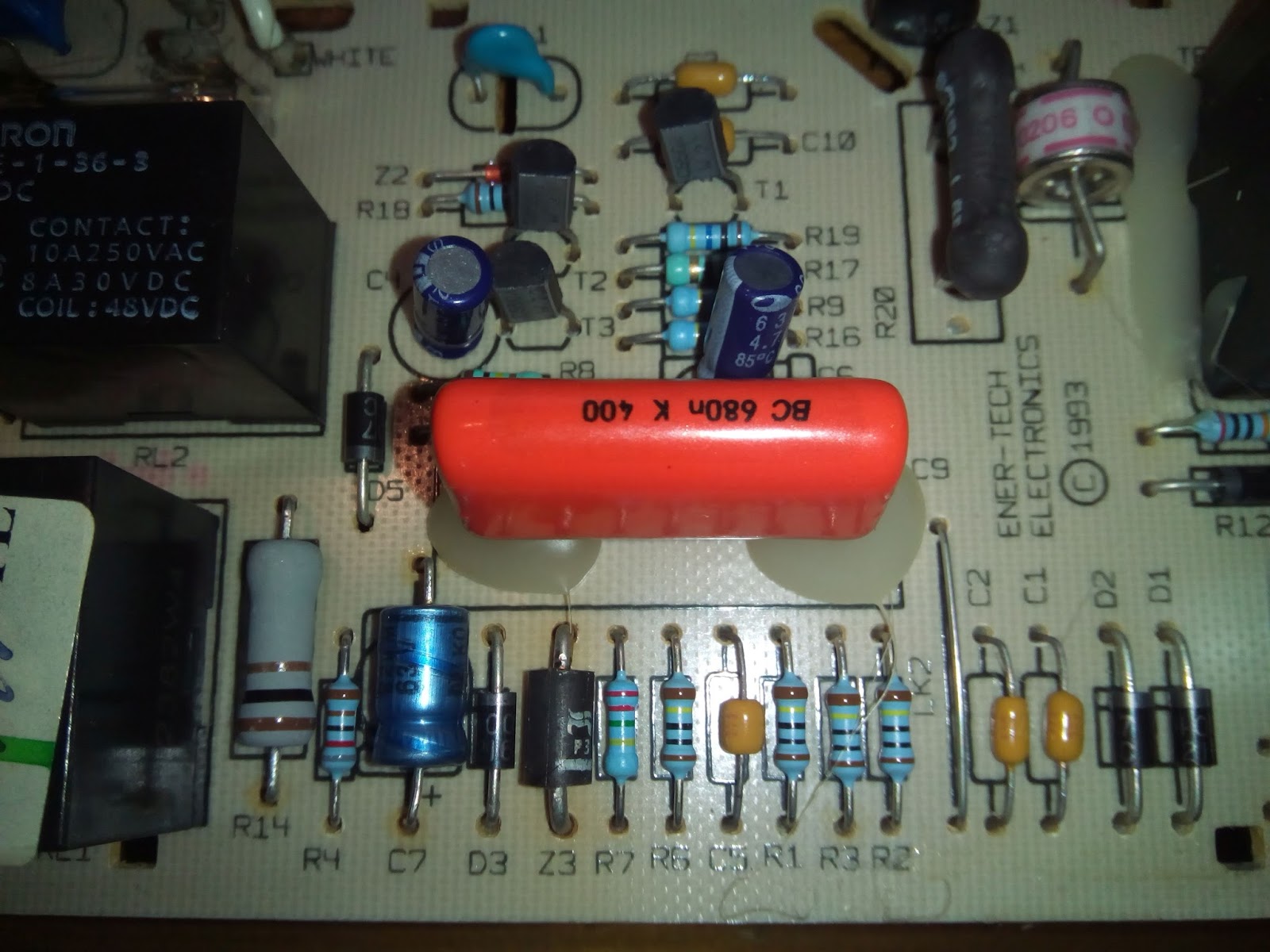
After:

Solder joins

ps1 I'm quite sure that if you can't get the axial one then you should still be able to solder radial one because the legs are long enough - but try to get the same one :)
ps2 I checked all ceramic capacitors and they were all OK (kind of as expected since there is no electrolyte to evaporate).
Sunday, 19 March 2017
Kernel Panic - Not syncing : VFS: unable to mount root fs on unknown-block (0,0)
Just a quick brain dump after I recovered my home server running centos 7. I had to recover it because it was failing to boot after I did
yum update
I have to admit, it was partially my fault it failed. I was running several python scripts trying to brute-force something for one of the CTF (Capture The Flag) I'm doing at the moment :)
Yum froze when it tried to update python... I couldn't see any other option than kill the process. After restart... I was getting sad message:
Kernel Panic - Not syncing : VFS: unable to mount root fs on unknown-block (0,0)
I was able to boot using previous kernels and recovery mode so a quick google search gave me a command to remove invalid kernel (all commands have to be run as root or with sudo):
First find out the exact version of the kernel you want to remove:
Loading mirror speeds from cached hostfile
* base: mirrors.clouvider.net
* epel: mirrors.coreix.net
* extras: mirrors.vooservers.com
* updates: mirrors.coreix.net
Installed Packages
kernel.x86_64 3.10.0-327.el7 @anaconda
kernel.x86_64 3.10.0-514.2.2.el7 @updates
kernel.x86_64 3.10.0-514.6.1.el7 @updates
kernel.x86_64 3.10.0-514.10.2.el7 @updates
Then remove the invalid one:
Run update again (this time without python running in the background ;) )
Restart to enjoy your new kernel (you do not have to do this immediately but it's good to check rather quickly if everything will work after reboot)
yum update
I have to admit, it was partially my fault it failed. I was running several python scripts trying to brute-force something for one of the CTF (Capture The Flag) I'm doing at the moment :)
Yum froze when it tried to update python... I couldn't see any other option than kill the process. After restart... I was getting sad message:
Kernel Panic - Not syncing : VFS: unable to mount root fs on unknown-block (0,0)
I was able to boot using previous kernels and recovery mode so a quick google search gave me a command to remove invalid kernel (all commands have to be run as root or with sudo):
First find out the exact version of the kernel you want to remove:
yum list kernelLoaded plugins: fastestmirror
Loading mirror speeds from cached hostfile
* base: mirrors.clouvider.net
* epel: mirrors.coreix.net
* extras: mirrors.vooservers.com
* updates: mirrors.coreix.net
Installed Packages
kernel.x86_64 3.10.0-327.el7 @anaconda
kernel.x86_64 3.10.0-514.2.2.el7 @updates
kernel.x86_64 3.10.0-514.6.1.el7 @updates
kernel.x86_64 3.10.0-514.10.2.el7 @updates
Then remove the invalid one:
yum remove kernel-3.10.0-514.10.2.el7
Run update again (this time without python running in the background ;) )
yum update
Restart to enjoy your new kernel (you do not have to do this immediately but it's good to check rather quickly if everything will work after reboot)
shutdown -r now
Wednesday, 23 December 2015
IIS - SSL certificate installation - Cannot find the certificate request that is associated with this certificate file. A certificate file must be completed on the computer where the request was created.
Recently I had to install new SSL certificate on Windows Server 2008 R2 running IIS 7.
Just like everybody else I generated CSR (certificate signing request) and sent it to CA which was issuing certificate for me. They sent me the certificate in PKCS7 format. When I tried to "Complete Certificate Request" in IIS Manager by giving a domain name as "friendly name" which is a REQUIRED field it said:
"Cannot find the certificate request that is associated with this certificate file. A certificate request must be completed on the computer where the request was created"
 So my first thought was that the certificate was generated incorrectly and is corrupted. But that would be highly unlikely... the CA I used are one of the biggest and most trusted.
So how to fix it?
Just like everybody else I generated CSR (certificate signing request) and sent it to CA which was issuing certificate for me. They sent me the certificate in PKCS7 format. When I tried to "Complete Certificate Request" in IIS Manager by giving a domain name as "friendly name" which is a REQUIRED field it said:
"Cannot find the certificate request that is associated with this certificate file. A certificate request must be completed on the computer where the request was created"

So how to fix it?
- you have to start certmgr.msc
- import this certificate into your personal certificates.
- right click on this certificate and choose properties
- EDIT friendly name because it is most likely EMPTY (I'm sure you can see the problem here)
- close the properties window
- export this certificate
- use this new exported cert with KNOWN friendly name and now the Complete Certificate Request should work without issues!
Wednesday, 5 June 2013
Why I hate TFS even more...
Situation:
- you have an open solution
- you need to access code from another solution which is in TFS (but not on your disk)
- so...
No, this is not what is happening... TFS tells you that you have to close the currently open solution to do that.... How retarded is that? Why would you need to close solution for this? To download some files not even in solutions directory?
Obviously "Compare..." option is retarded as well - BIG time.
If you are comparing whole solution (quite a big one) and you want to revert/or whatever just one file at a time - TFS will refresh the whole tree again after modifying each file... which might take another precious minute. Unless everybody in TFS development team is always reverting all files at once and never one by one I just can't understand why this feature is broken so badly.
Is there any manager in Microsoft's TFS team which ever worked with SVN / Perforce / Git ?
- you have an open solution
- you need to access code from another solution which is in TFS (but not on your disk)
- so...
- go to "Team Explorer"
- double click on "Source Control"
- find the code you need and right click
- select "Map to local folder"
- select location on your local hard drive
- click "Map"
- click "Yes" to prompt: "Newly mapped items will not be downloaded until you execute a get. Do you want to get $/SomePlaceWithCode now?"
No, this is not what is happening... TFS tells you that you have to close the currently open solution to do that.... How retarded is that? Why would you need to close solution for this? To download some files not even in solutions directory?
Obviously "Compare..." option is retarded as well - BIG time.
If you are comparing whole solution (quite a big one) and you want to revert/or whatever just one file at a time - TFS will refresh the whole tree again after modifying each file... which might take another precious minute. Unless everybody in TFS development team is always reverting all files at once and never one by one I just can't understand why this feature is broken so badly.
Is there any manager in Microsoft's TFS team which ever worked with SVN / Perforce / Git ?
Wednesday, 3 April 2013
Subscribe to:
Posts (Atom)